
Hermes Game Download|Play, Spin & Rewards
Description
Hermes App Details
| Detail | Info |
|---|---|
| App Name | Hermes |
| Version | 1.2.50 |
| App Size | 7.73 MB |
| Package | com.cgptf117.Hermes |
| Installed From | Chrome |
| Permissions | None granted |
| Background Usage | Allowed |
| Notifications | Off |
| Unknown App Install | Not allowed |
Hermes Game is a mobile-oriented gaming platform built around a red, gold, and black interface. Its main area brings games, promotions, rewards, account controls, deposit and withdrawal options, a Lucky Wheel, and invitation features together. The platform also highlights a downloadable version with a “Download Bonus Rs777” message, while promotional cards are displayed throughout the home and activity areas.
The game lobby is arranged into multiple categories, including Hot, Slots, Blockchain, Fishing, Casino, and Sport. In addition, the interface includes familiar titles and collections such as Aviator, Chicken Road 2, 7UP 7DOWN, Money Coming, Super Ace, Mines, JILI Games, INOUT, PG Soft, KoolBet, and Evolution Gaming.
Table of Contents
A Golden Red Gaming Hub
Hermes Game uses an eye-catching dark-red background with gold buttons and promotional graphics. The Home screen places the Hermes game name near the top, followed by Live Chat 24/7, Lucky Wheel, and Bonus shortcuts.
Promotional banners occupy a noticeable portion of the interface. Below them, users can see their UID, rupee balance, and VIP level. Deposit, Withdraw, and Mail buttons are displayed alongside this account information.
The bottom navigation keeps five major sections available: Home, Promo, Get 1500, Earn, and Mine. Consequently, users can switch between gaming, offers, rewards, and account-related sections without navigating through many separate menus.
Creating a Hermes Game Account
The registration window contains separate Login and Register tabs. To create an account, the user begins with a mobile number. The phone field displays the +92 country code.
Next, there are fields for Password and Confirm Password. Eye icons beside both password boxes allow users to view or hide their entered passwords.
An Invite Code field is also included and is explicitly marked “Optional.” Therefore, an invitation code is not presented as a mandatory part of the registration form.
Before selecting Register, users have a checkbox for acknowledging the Privacy Agreement. A promotional tag beside the registration button displays “+Rs30~6,017.”
Hermes Game offers a Google option under Quick Login, providing another visible account-access choice.
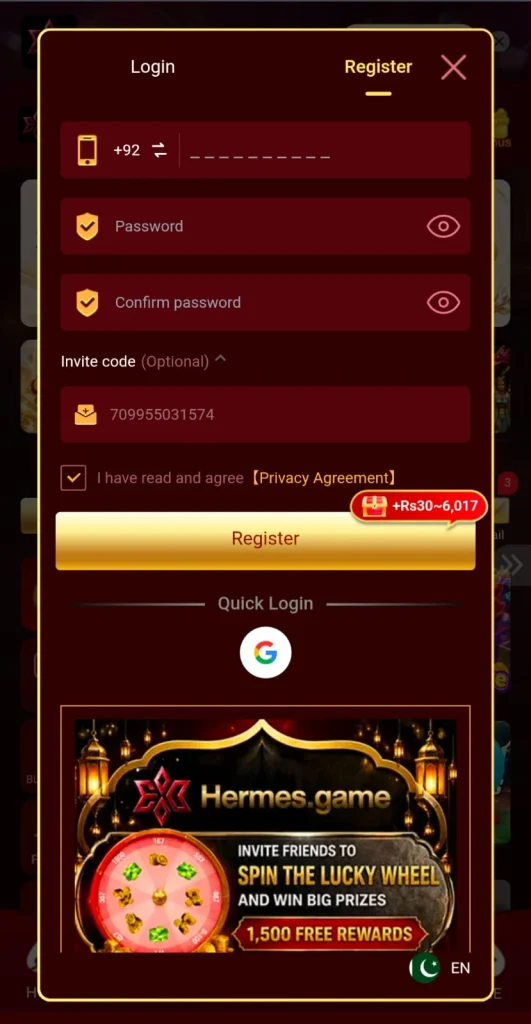
Invitation Feature Directly Inside Registration
One interesting part of the registration page is that promotional invitation content appears directly below the standard account controls. It advertises an opportunity to invite friends, spin a Lucky Wheel, and access “1,500 Free Rewards.”
This makes the referral system visible even before a new user finishes exploring the main platform. However, because promotional amounts can be linked to particular challenges, users should consult the corresponding conditions rather than treating every displayed figure as an automatic reward.
Game Lobby: Multiple Categories in One Place
The central lobby is structured around a vertical category bar. Visible categories include Hot, Slots, Blockchain, Fishing, Casino, and Sport.
Instead of presenting titles through plain text, Hermes Game uses colorful graphical tiles. For example, the home area includes Money Coming, Super Ace, Mines, Chicken Road 2, and PG Soft content. JILI Games and INOUT also have dedicated tiles.

Further down, users can find KoolBet and Evolution Gaming, while Aviator appears as another prominently displayed option.
This tile-based structure means users can visually browse different sections and choose content from the home page.
Hot Games and Featured Titles
The Hot button uses a flame icon and sits near the top of the category selector. This area highlights games that receive prominent placement.
Several titles and collections are visible, including Aviator, 7UP 7DOWN, Andar Bahar, Chicken Road 2, Mines, Money Coming, and Super Ace. In addition, JILI, INOUT, PG Soft, KoolBet, and Evolution Gaming appear in the lobby.
Because the selection is divided across tiles and categories, the interface provides different routes for discovering available games.
Promotions Have Their Own Activity Center
The Promo section opens an Activity area. At the top, users can switch between “Activity” and “Unclaimed.” Red notification counters indicate when an item may require attention.
The promotional feed includes a card advertising “Get Rs 1500” as part of an invitation challenge. Other cards are labeled “Cooperation Alliance W33” and “Cooperation Alliance OK222.”

Another promotion encourages users to monitor their inbox. Its banner states that users can get up tRs 1,000,00000 in rewards daily, while the card itself says, “Check your inbox for a Super Bonus!”
A first-deposit promotion is also visible and advertises a 30% bonus. Since the Activity area presents several different campaigns, it acts as the central location for reviewing current promotional content.
Download Bonus Section
At the top of the home interface, Hermes Game displays a download banner with the text “Download Bonus Rs777.” A gold Download button is positioned on the right.
This provides a direct route to the downloadable version while keeping the offer visible from the main screen. Moreover, its placement above the game lobby means users do not have to search through menus to find the download control.
Quick Access to Wallet Features
Hermes Game places its financial controls directly below the promotional area. The displayed account section contains a UID, VIP 0 indicator, and rupee balance.
Three shortcuts are positioned next to these details: Deposit, Withdraw, and Mail. A promotional figure is also displayed above the Deposit icon.
This arrangement makes the account area easy to distinguish from the gaming catalogue below it. Users who want to manage their balance can access the relevant controls before selecting a game.
Hermes Game Deposit System
The Deposit page includes two visible payment methods: JazzCash and Easypaisa. Users must first select a payment method and then choose a Quick deposit channel.
Several Quick deposit options appear on the page. The deposit amount range is clearly stated as:
Minimum deposit: Rs 200
Maximum deposit: Rs 50,000
Users can manually enter an amount or use one of the preset values.
Available presets include Rs 200, Rs 300, Rs 500, Rs 1,000, Rs 2,000, Rs 3,000, Rs 5,000, Rs 10,000, Rs 20,000, Rs 30,000, and Rs 50,000.
Therefore, the deposit page accommodates both relatively small and significantly larger values within the displayed range.
Extra Figures Displayed With Deposit Amounts
Different deposit values have additional figures displayed above them. For example, the visible page associates Rs 200 with +60, Rs 300 with +90, and Rs 500 with +160.
Further options show figures such as +320, +950, +1117, +2237, +4717, and +6017. Since these figures are presented in connection with promotional deposit events, users should check the applicable event details before making assumptions about eligibility.
The payment-method area also shows +1000 near JazzCash and +799 near Easypaisa.
New Register Deposit Event
The Deposit page includes a timed “Deposit Event.” The selected event states “New Register Can Get 30%.”
This is consistent with the first-deposit promotional material displayed elsewhere in the platform. A countdown timer is positioned beside the Deposit Event title.
Recharge instructions state that Hermesgame recharge orders will be credited within 1–3 minutes. The page also says that if network fluctuations prevent payment, users should submit the recharge order again.
A large gold Deposit button appears at the bottom to complete the process.
Lucky Wheel: A Dedicated Reward Experience
The Lucky Wheel is one of the most visually distinctive parts of Hermes Game. It consists of a large circular wheel divided into multiple prize segments.
Values visible around the wheel include 167, 557, 887, 0–100, 177, 457, 357, and 1500. Illustrations of coins and green cash bundles fill the inner segments.
The center of the wheel reads “X1 Free Spin.” Below the wheel, a “Next Free Spin” countdown tells the user when another spin becomes available.
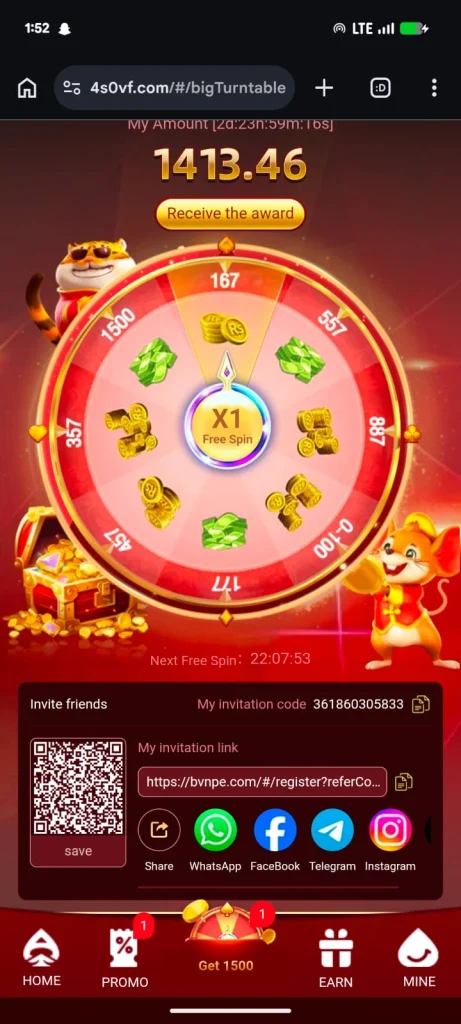
At the top, a “Receive the award” button is displayed underneath a large amount. Thus, the wheel operates as a separate rewards-oriented section rather than appearing as a small feature inside the main game grid.
Get 1500 Section
The center button in the bottom navigation is labeled “Get 1500” and uses a wheel illustration. Its position gives the reward functionality considerably more prominence than a standard secondary menu option.
The invitation-related material also repeatedly references 1,500 rewards. This creates a close visual connection among the Get 1500 control, invitation challenges, and Lucky Wheel.
Because the interface also provides countdowns and separate promotional areas, the exact requirements should be checked within the relevant offer before participation.
Invite Friends Through Multiple Apps
Hermes Game includes an integrated referral-sharing system below the Lucky Wheel. Users are given an invitation code as well as a dedicated invitation link.
A QR code is shown on the left, with a “save” option below it. Consequently, users can save the QR code rather than sharing only a conventional URL.
Several sharing methods are provided. These include WhatsApp, Facebook, Telegram, Instagram, and a general Share control.
This is particularly convenient because referral information and sharing shortcuts appear together. Users do not need to manually move an invitation code into a separate social application.
Mail and Inbox Rewards
Mail receives its own shortcut on the home screen, complete with notification badges when items are available. This is notable because one of the promotions specifically encourages users to “Keep an eye on the inbox.”
The Activity section also includes the message “Check your inbox for a Super Bonus!” As a result, Mail serves as more than a simple account-message icon within the overall interface; it is also connected to promotional activity.
Live Chat and Bonus Shortcuts
At the top of the home page, three quick-access controls appear together: Live Chat 24/7, Lucky Wheel, and Bonus.
Live Chat 24/7 uses a headset-style icon, making the support option easy to recognize. Lucky Wheel leads toward the spin-based reward functionality, while Bonus provides another direct route to promotional content.
These shortcuts complement the permanent navigation menu at the bottom and reduce the steps needed to reach commonly highlighted sections.
Hermes Game Pros and Cons
Pros
- The interface provides multiple game categories, including Hot, Slots, Blockchain, Fishing, Casino, and Sport. JazzCash and Easypaisa are both displayed as payment options. Registration includes Google Quick Login, while the invite code is marked optional. Users also get integrated Deposit, Withdraw, Mail, Live Chat 24/7, Lucky Wheel, Promo, Earn, and Mine controls. Users can share referral links through several popular apps, and preset deposit amounts make selection straightforward.
Cons
- Numerous promotional banners, notification counters, game tiles, and reward figures can make the Home screen feel crowded. Several promotional values appear in different areas, requiring users to review the specific offer before understanding its requirements. Likewise, some Lucky Wheel and invitation mechanics are not fully described on their main screens.
A Closer Look at the Bottom Menu
Hermes Game keeps its navigation consistent through five large bottom buttons. Home is the primary game lobby, whereas Promo provides access to activities and offers.
Get 1500 occupies the middle and is represented by a colorful wheel. Earn uses a gift icon and appears dedicated to earning or reward-related features. Finally, Mine uses a profile-style symbol and provides access to the personal account area.
Notification badges can appear above these buttons. Therefore, users can quickly identify when a promotional or reward section contains something new.
A Game Lobby With Reward Features Built Around It
Hermes Game does not separate its promotional functions from its gaming experience. Instead, rewards and promotions are visible in nearly every major area.
The home screen highlights inbox rewards and daily cashback. Registration displays invitation and Lucky Wheel material. Promo contains invitation bonuses, alliance cards, inbox rewards, and first-deposit campaigns. Meanwhile, the central Get 1500 button keeps the wheel easily accessible.
This creates an experience where browsing games and checking current promotions are closely connected.
Hermes Game FAQs
Q1: How do I register for Hermes Game?
The registration form requires a +92 mobile number, password, and password confirmation. An invitation code is available but marked optional. Users also need to acknowledge the Privacy Agreement before registration.
Q2: Is Quick Login available?
Yes. A Google Quick Login option appears on the registration screen.
Q3: What game categories can I find?
The visible categories include Hot, Slots, Blockchain, Fishing, Casino, and Sport.
Q4: Which games are displayed?
The interface shows titles such as Aviator, Chicken Road 2, 7UP 7DOWN, Mines, Money Coming, and Super Ace. Collections including JILI Games, INOUT, PG Soft, KoolBet, and Evolution Gaming are also displayed.
Q4: What are the available deposit methods?
JazzCash and Easypaisa are the two payment methods visible on the Deposit page.
Q5: What is the minimum deposit?
The minimum displayed deposit is Rs 200.
Q6: What is the maximum deposit?
The maximum displayed amount is Rs 50,000.
Q7: Does Hermes Game have a Lucky Wheel?
Yes. It includes a dedicated wheel with an X1 Free Spin indicator, several displayed prize values, and a countdown to the next free spin.
Q8: Can users invite friends?
Yes. Hermes Game provides an invitation code, referral link, QR code, and social sharing options.
Q9: Which sharing apps are available?
WhatsApp, Facebook, Telegram, and Instagram are displayed, along with a general Share button.
Q10: Is there a first-deposit promotion?
A promotional card states “First Deposit Bonus Can Get 30% bonus,” while the Deposit Event displays “New Register Can Get 30%.”
Final View of Hermes Game
Hermes Game combines a multi-category gaming lobby with promotions, deposits, withdrawals, referral sharing, inbox features, and a prominent Lucky Wheel. Its Home screen provides quick access to both games and account functions, while the bottom navigation separates Home, Promo, Get 1500, Earn, and Mine into easily identifiable areas.
JazzCash and Easypaisa provide the visible deposit choices, with the displayed deposit range running from Rs 200 to Rs 50,000. The registration process supports a +92 mobile number, password creation, an optional invitation code, Privacy Agreement acknowledgement, and Google Quick Login.
Overall, the platform’s defining feature is how closely it connects the gaming catalogue with its reward system. The Lucky Wheel, invitation sharing, Activity center, Mail notifications, deposit events, and promotional banners remain highly visible throughout the interface. Because individual campaigns contain different figures and conditions, checking each active promotion and its applicable details is important before using an offer.
pk2patti.com

Article Contributor
This guide was researched and written by Pervaiz for PK2Patti.com, focusing on gaming platforms, APK guides, and user-focused content.
Pervaiz |PK2Patti.com
Gaming Research & Content Analysis