
z7 Game Download |Explore, Play & Earn Rewards
Description
Z7 Game presents a mobile-focused gaming platform built around a green-and-white interface. Its main area combines different gaming categories with promotions, account tools, deposits, invitations, and customer-support options. The navigation is relatively straightforward because frequently used sections such as Home, Promo, Invite, Support, and Profile are placed together in the bottom menu.
Z7 uses Pakistani rupees (PKR) as the displayed account currency. The registration process also includes a Pakistan +92 phone number option, while the deposit area provides locally recognizable methods such as JazzCash and Easypaisa. Alongside these account features, the platform contains multiple game sections, including Fishing, Live, and Mini Games.
Promotional material is another noticeable part of Z7. Offers related to initial deposits, invitations, member activities, app downloads, and other events appear in different areas. However, individual offers can have their own conditions, values, or time limits, so users should read the information attached to an offer rather than assuming every promotion works in the same way.
Table of Contents
Getting Started With a Z7 Account
Z7 Game provides separate Register and Login tabs. New users can choose registration, whereas people who already have an account can use the Login section.
The registration form supports a phone number/profile entry. Under password registration, a password field is available together with a visible strength indicator. There is also a Code register option, giving the registration interface more than one selectable route.
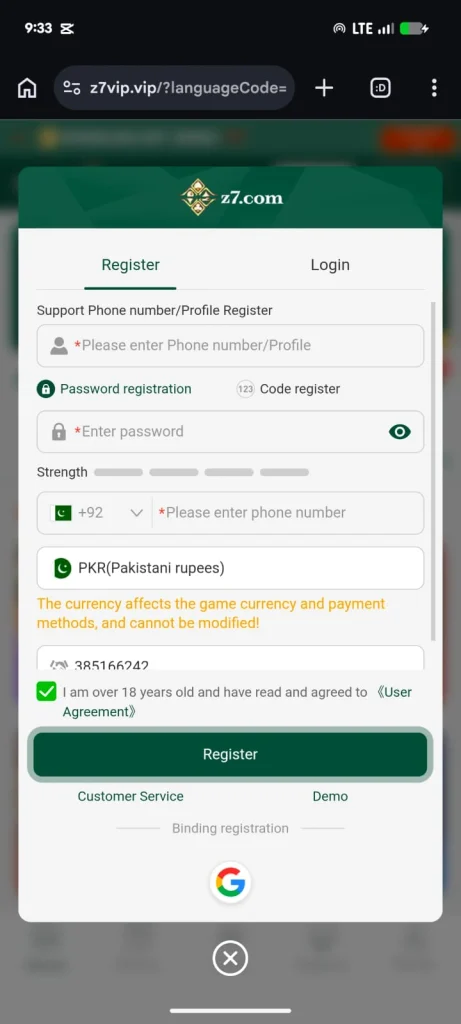
For Pakistani users, +92 appears as the selected dialing code. PKR (Pakistani rupees) is displayed as the currency, and an important notice states that the selected currency affects game currency and payment methods and cannot be modified. Consequently, checking the currency information before completing registration is important.
An age and agreement checkbox is included as another step. Its text states that the user is over 18 years old and has read and agreed to the User Agreement. Finally, the main Register button completes the visible registration process.
Customer Service and Demo options are positioned underneath the registration button. A Google option also appears under “Binding registration.”
What Happens After Registration?
After successful account creation, Z7 displays a “Registration Successful!” message. The same window introduces new-member benefits and promotes a reward connected with the first recharge.
One displayed promotion says “Receive an 8888 reward on your first recharge.” Another part of that window specifies “First Deposit ≥ 100” and displays a maximum amount of Rs 15,000.00. A limited-time countdown is also present beside the offer.
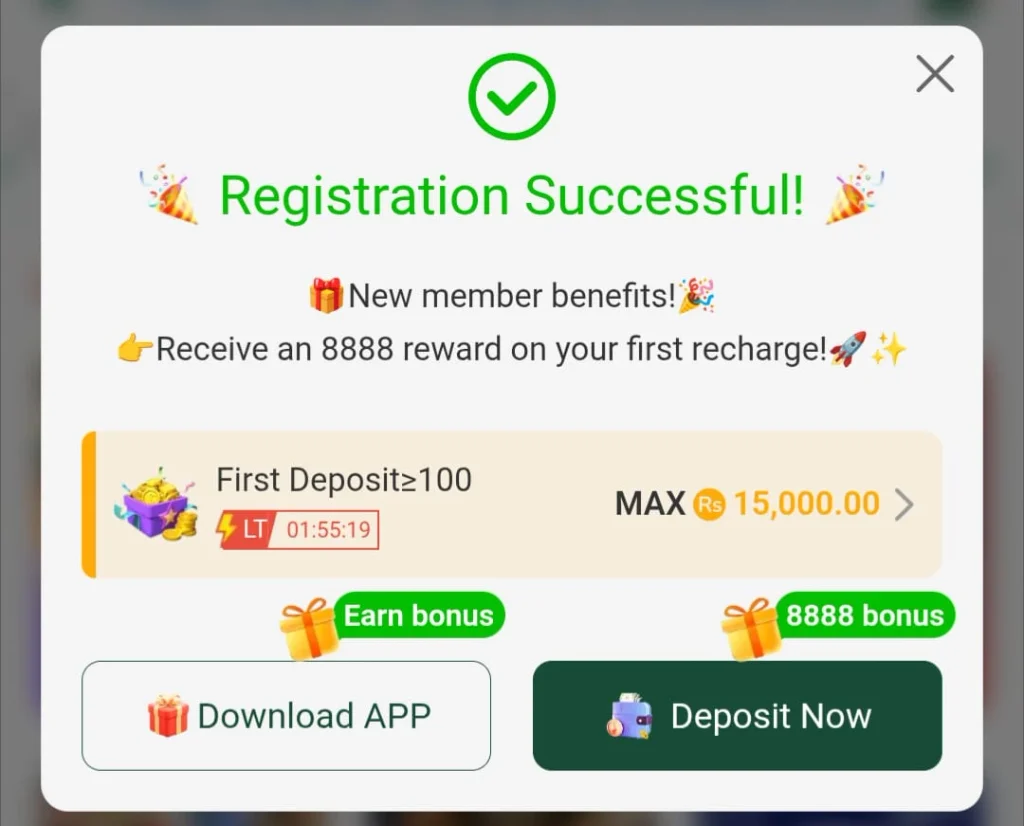
Two prominent choices are available from this window: Download APP and Deposit Now. Therefore, a newly registered user can move toward installing the app or visiting the deposit section directly.
Importantly, the promotional wording should be read together with the conditions presented by Z7. A headline number alone does not explain every requirement that may apply to a reward.
Exploring the Z7 Game Home Page
The Home page serves as the central gaming area. At the top, an account balance indicator is displayed beside a Deposit button. A download-app promotion is also presented prominently.
Below this area is a large promotional banner. One visible banner advertises “3 Times a Day” and a maximum drop of Rs 288888. Promotional notices continue underneath, including a message referring to a Wheel of Fortune.
For browsing, Z7 supplies category shortcuts such as Fishing, Live, Mini Games, Recent, and Favorites. These categories can help reduce the need to search through the entire game selection whenever a user wants to return to something recently opened or previously marked as a favorite.
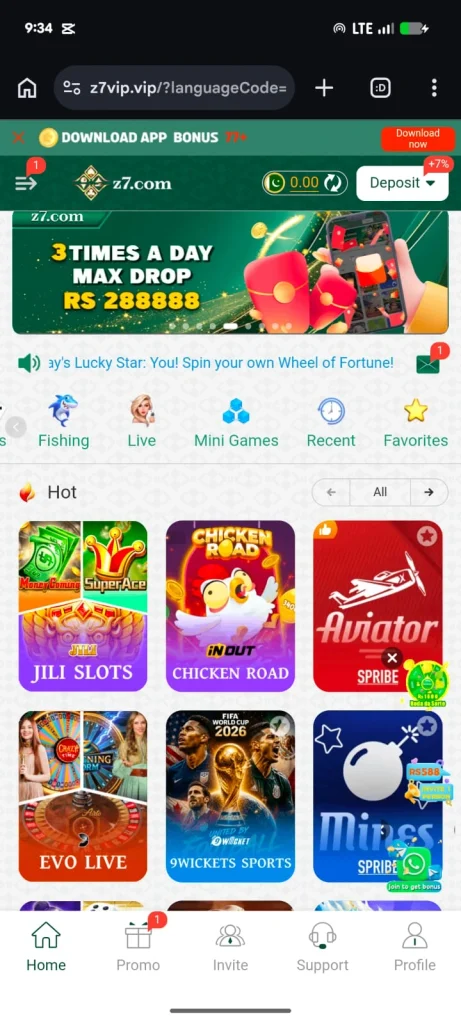
The Hot area contains visually distinct game cards. Visible titles include JILI Slots, Chicken Road, Aviator, EVO Live, 9Wickets Sports, and Mines. Thus, the home interface mixes several game styles within a single browsing page rather than limiting itself to one type.
The bottom navigation remains important throughout the experience. Home opens the main selection, Promo leads to promotional material, Invite contains referral-related functions, Support provides assistance options, and Profile is used for account-related access.
Promotions and Events
Z7 dedicates a substantial section to promotions. Inside this area, top-level choices include Event, Fund, VIP, Mission, and Rebate, while the Event page itself contains filters such as All, New, Player Rewards, Agent Rewards, and Download the app.
One event advertises “Receive Rs 1500 for Free” alongside a wheel graphic. Another promotes a “Member Day Carnival” and labels it as taking place every month on the 1st. The displayed promotion connects first deposits with a bonus boost.
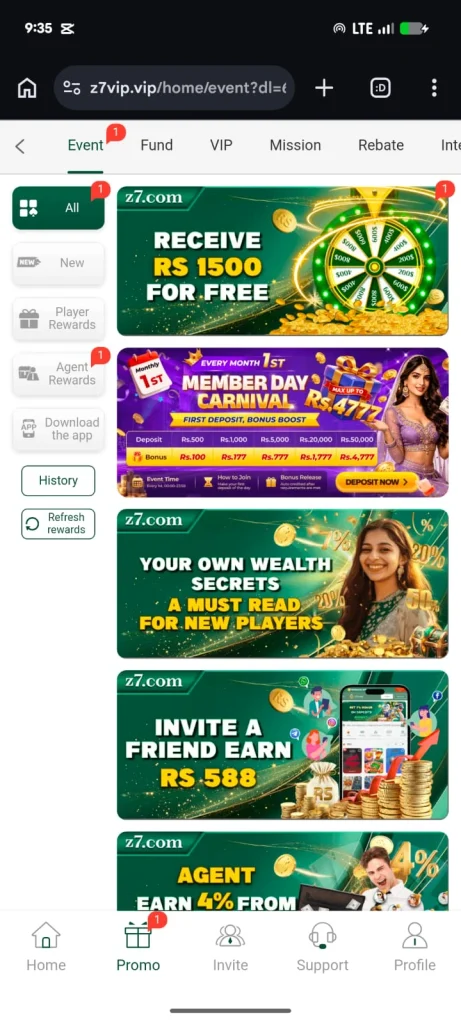
The Member Day material shows several deposit and bonus pairs. Deposit figures displayed include Rs.500, Rs.1,000, Rs.5,000, Rs.20,000, and Rs.50,000, while the corresponding visible bonus figures are Rs.100, Rs.177, Rs.777, Rs.1,777, and Rs.4,777.
Additionally, another promotional card is presented as information for new players under the wording “Your Own Wealth Secrets – A Must Read for New Players.” An invitation banner advertises “Invite a Friend Earn Rs 588.” An agent-related promotion is also visible further down the page.
Users can access History and Refresh rewards from the event interface. These controls make the promotion area more than a simple collection of banners, since it also contains tools associated with reward activity.
Z7 Invite and Referral Area
The Invite page contains considerably more detail than a simple referral link. Its navigation includes Home, Promotion Sharing, My Data, Commission, and Subordinate. This structure suggests that invitation activity and related information are organized into several subsections.
A user invitation code is displayed alongside copy functionality. The Invite friends area also provides a QR code and a referral URL. Sharing choices include a general Share control plus WhatsApp, Telegram, and Instagram.
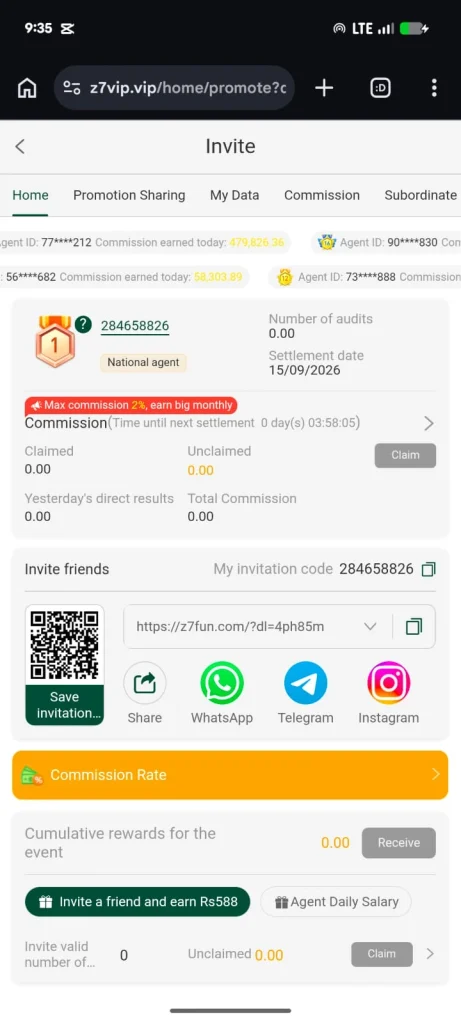
This arrangement makes the invitation process convenient from a mobile device. A user can copy the relevant information, save an invitation image, use the QR code, or select one of the presented sharing channels.
Commission information occupies another part of this screen. Fields include Claimed, Unclaimed, Yesterday’s direct results, and Total Commission, together with a Claim button. A Commission Rate section is available as well.
The displayed interface states “Max commission 2%, earn big monthly.” Elsewhere, invitation material promotes an Rs588 reward for inviting a friend. There is also an “Agent Daily Salary” option and an area for cumulative event rewards.
Because these are promotional or commission-related features, conditions matter. The presence of a sharing link or advertised amount does not by itself establish when a reward becomes claimable; users should rely on the applicable information and requirements available within the platform.
Deposit Options and Account Funding
Z7 provides a dedicated Deposit interface showing the current balance at the top. It separates Online deposit and Cryptocurrency into tabs, with visible promotional labels of +3% and +7%, respectively.
Within Online deposit, the visible payment methods include JazzCash, Easypaisa, and Scan with EasyPaisa. JazzCash and Easypaisa each display “Max ₹1000” in the provided interface, while Scan with EasyPaisa displays “Max ₹1500.” Since those are the labels presented on the payment screen, users should follow the current on-screen values while making a transaction.
The deposit amount field shows a range of “Min 100~Max 50,000.” Below it, quick amount buttons make common selections easier.
Several amount-and-addition combinations are displayed. Rs100 shows +20.00, Rs500 shows +80.00, Rs1,000 shows +163.00, and Rs3,000 shows +345.00. Meanwhile, Rs5,000 displays +380.00, Rs10,000 displays +670.00, Rs30,000 displays +2,050.00, and Rs50,000 displays +2,500.00.
A Deposit promotion panel appears below these choices and contains a countdown. It states that qualifying users automatically participate in the listed activities. Visible examples include Bonus 20.00 for First Deposit ≥ 100 and Bonus 50.00 for First Deposit ≥ 300, with further bonus entries continuing down the section.
Therefore, users have both manual amount entry and preset deposit choices. Nevertheless, checking the corresponding promotion information before depositing is sensible because different amounts are presented with different bonus figures.
Customer Support and Message Center
Customer assistance receives its own section rather than being hidden inside account settings. The Message Center contains Support, News, Notice, Marquee, and Reward Feedback tabs.
Within Support, Z7 advertises 24/7 Customer Service and provides a button labeled “24/7 support.” The text says users can chat with professional customer service online to solve problems.
The Other Support area lists additional contact choices. A technical-support service is shown with online hours from 00:00 to 23:59. Instagram and Telegram contacts are also displayed, and both are presented with the same 00:00–23:59 online-time range.
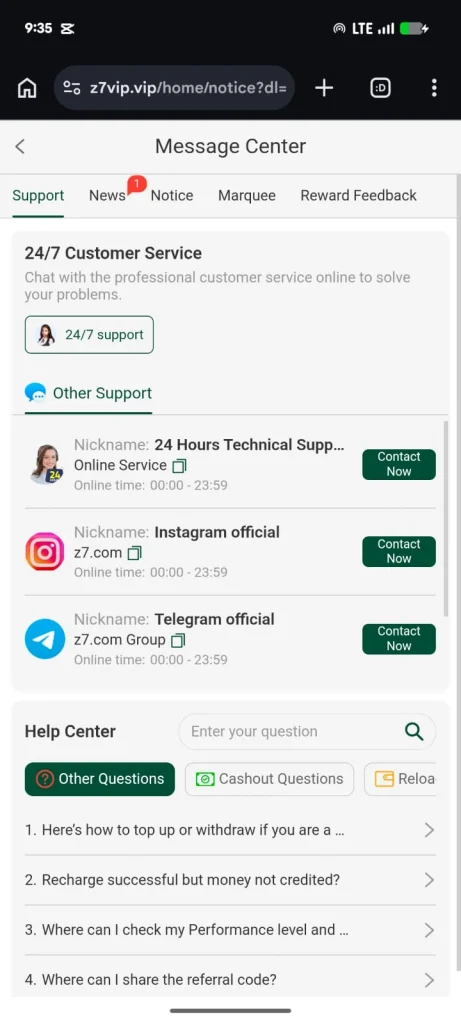
A Help Center appears further down the page. It has a search field so users can enter a question rather than manually browsing everything. Categories include Other Questions, Cashout Questions, and a partially visible reload-related category.
Visible help topics cover situations such as topping up or withdrawing, a successful recharge where money has not been credited, checking performance information, and finding where to share a referral code. As a result, the support area combines direct contact methods with self-service guidance.
Interface and Navigation Experience
The overall Z7 design relies heavily on green, white, gold, and occasional orange highlights. Main buttons are generally large, while icons accompany important functions. This visual approach is particularly noticeable in registration, deposits, promotions, and support.
Moreover, Home, Promo, Invite, Support, and Profile remain clearly represented in the bottom navigation. Game categories use recognizable illustrations, while promotions rely on larger banners and bold monetary figures.
There is a considerable amount of promotional information on some pages. Although this makes current offers easy to notice, users who simply want to browse games may find the interface visually busy. In contrast, dedicated sections and category icons help keep the main functions separated.
Useful Details to Check Before Using Z7
Account creation deserves careful attention because Z7 explicitly says that the selected currency affects game currency and payment methods and cannot be changed. Users should therefore verify their selected phone information, currency, and password before pressing Register.
Likewise, promotional values should not be considered independently from their requirements. First-deposit thresholds, countdowns, bonus amounts, and maximum values appear in several places. Checking each offer at the time of participation is consequently more useful than relying only on the largest advertised figure.
The same principle applies to deposits. The payment page displays a minimum and maximum deposit range, selectable amounts, payment methods, and bonus information. Reviewing all of these fields before proceeding can prevent confusion about which visible promotion corresponds to a particular amount.
Pros and Cons of Z7 Game
Based specifically on the available Z7 interface, several strengths and limitations stand out:
| Pros | Cons |
|---|---|
| Provides clear Register and Login sections | Some pages contain many promotional elements at once, which can make the interface feel crowded |
| Displays PKR currency support | Bonus structures contain different values and eligibility thresholds, so users need to read individual conditions carefully. |
| Includes +92 phone registration | The registration page warns that currency cannot be modified after selection, so an incorrect initial choice could matter. |
| Offers JazzCash and Easypaisa deposit choices | |
| Organizes games into multiple categories | |
| Provides Recent and Favorites shortcuts | |
| Includes numerous promotional sections | |
| Supplies QR/link-based invitation tools | |
| Offers WhatsApp, Telegram, and Instagram sharing options | |
| Has a dedicated Help Center plus 24/7 support messaging |
Frequently Asked Questions About Z7 Game
Q1: Does Z7 support registration with a Pakistani phone number?
Yes. The registration interface displays Pakistan’s +92 dialing code and provides a field for entering a phone number.
Q3: Which currency appears on Z7?
The registration page displays PKR (Pakistani rupees). It also states that the currency affects game currency and payment methods and cannot be modified.
Q4: What game categories are available?
Visible categories include Fishing, Live, and Mini Games. Recent and Favorites sections are also provided for easier browsing.
Q5: Which games can be seen on the Home page?
Visible titles include JILI Slots, Chicken Road, Aviator, EVO Live, 9Wickets Sports, and Mines.
Q6: Does Z7 have deposit methods for Pakistani users?
The Online deposit screen displays JazzCash, Easypaisa, and Scan with Easypaisa. A Cryptocurrency tab is also present.
Q7: What is the displayed deposit range?
The amount field displays a minimum of Rs100 and a maximum of Rs50,000.
Q8: Does Z7 offer an invitation feature?
Yes. The Invite area provides an invitation code, QR code, referral URL, copy controls, and sharing choices including WhatsApp, Telegram, and Instagram. It also contains commission and reward-related sections.
Q9: Is customer support available?
The Message Center displays 24/7 Customer Service. Technical support, Instagram, Telegram, and a searchable Help Center are also presented.
Q10: Is Z7 restricted by age?
During registration, users are required to select a checkbox stating that they are over 18 years old and have read and agreed to the User Agreement.
Final Overview
Z7 combines games, promotional events, deposits, invitations, and support within a mobile-oriented interface. Its Home page focuses on quick category access and featured titles, whereas the Promo section collects multiple reward and event offers. Meanwhile, the Invite area supplies referral sharing and commission tools, and the Deposit section brings together payment choices, preset amounts, and bonus information.
For Pakistani users in particular, the visible +92 registration option, PKR currency selection, JazzCash, and Easypaisa provide locally oriented elements. In addition, support tools, a Help Center, social contact options, Recent games, and Favorites make important functions accessible from dedicated areas.
At the same time, Z7 contains a large number of bonuses and promotional offers with varying thresholds. Therefore, the most practical approach is to check the terms, amount requirements, countdowns, and other information attached to each offer before participating. Overall, Z7 presents a feature-packed gaming interface where registration, game browsing, account funding, promotional events, referral functions, and customer assistance are integrated into one mobile experience.
pk2patti.com

About the Contributor
Pervaiz creates research-driven gaming content for PK2Patti.com, focusing on platform reviews, feature analysis, and informative guides.
Pervaiz | PK2Patti.com
Gaming Content Researcher